Nowhere to Hide: Why Disabling Location Services Doesn't Actually Stop Apps From Tracking Where You Are
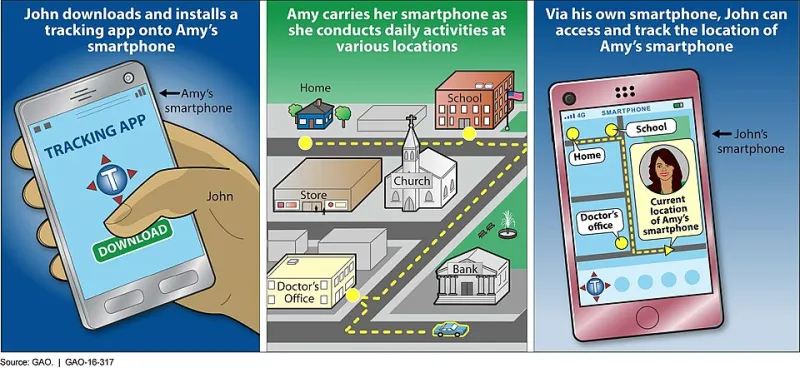
Photo: U.S. Government Accountability Office, Public domain, via Wikimedia Commons
There is a comforting ritual many smartphone users perform before bed or before a sensitive errand: a quick dive into settings, a toggle switched to off, and the quiet assumption that the device has stopped watching. Location services: disabled. Privacy: restored.
That assumption is one of the most consequential misconceptions in consumer technology today.
Researchers, privacy advocates, and federal investigators have spent years documenting the gap between what location controls promise and what they actually deliver. The result is a picture that should concern anyone who carries a smartphone — which is to say, nearly every adult in the United States.
The Toggle That Doesn't Turn Everything Off
When a user disables location services on an iPhone or Android device, they are cutting off GPS access for most apps. That is a meaningful step, but it is far from a complete solution. Modern devices and applications have developed a constellation of secondary methods to infer location — techniques that operate entirely outside the GPS permission framework.
Wi-Fi positioning is among the most pervasive. Even when a phone is not connected to a network, its Wi-Fi radio can scan for nearby access points. Each router broadcasts a unique identifier, and vast commercial databases — maintained by companies including Google and Apple — map those identifiers to physical addresses. An app with Wi-Fi scan access can cross-reference visible networks against these databases and pinpoint a device to within a few meters, no GPS required.
Bluetooth beacons, deployed extensively in retail stores, airports, stadiums, and transit hubs across the country, operate on a similar principle. Apps with Bluetooth permissions can detect these beacons and report precise indoor location data to back-end servers — data that often flows to third-party analytics firms without the user's meaningful awareness.
Cell tower triangulation adds another layer. A device connected to a cellular network is, by definition, in constant communication with towers whose geographic positions are known. Carriers retain this data, and in documented cases, it has been sold to aggregators who resell it to a remarkably diverse range of buyers.
Finally, IP address geolocation provides a coarser but still useful approximation of location whenever a device connects to the internet. While IP-based location is less precise than GPS, it can reliably identify a user's city, neighborhood, or — in dense urban environments — their block.
The App Ecosystem's Hidden Data Pipeline
Beyond hardware-level signals, the application layer presents its own set of problems. Many free apps — games, weather services, coupon aggregators, flashlight utilities — contain embedded software development kits (SDKs) from data brokers. These SDKs quietly harvest whatever signals are available and transmit them to centralized servers, where individual data points are aggregated into detailed movement profiles.
A 2023 investigation by privacy researchers at The Markup found that location data from ordinary consumer apps was being funneled to brokers who then sold it to clients ranging from hedge funds to government agencies. The individuals whose data was traded had no knowledge that the flashcard app they downloaded had effectively enrolled them in a commercial surveillance program.
The problem is compounded by what the industry calls data persistence — the practice of retaining historical location records long after they were collected. Even if a user deletes an app today, the data it transmitted over the preceding months or years remains in broker databases, where it can be purchased, leaked, or stolen.
How Threat Actors Weaponize Location History
For cybercriminals and other malicious actors, a detailed location history is not an abstract privacy concern — it is operational intelligence.
Stalking and physical surveillance represent the most direct threat. Domestic abusers, stalkers, and organized criminal groups have all been documented purchasing or stealing location data to monitor targets. Because the data often flows through commercial brokers rather than being obtained through direct device compromise, victims frequently have no indication they are being watched.
Burglary targeting is a less discussed but well-documented use case. A location history that shows a device — and by implication, its owner — leaving home every weekday at 8 a.m. and returning at 6 p.m. is a precise burglary schedule. Criminals with access to broker data or compromised app accounts have used exactly this kind of pattern analysis to identify and time residential break-ins.
Fraud and social engineering represent a subtler application. Knowing that a target frequents a specific bank branch, visits a particular medical facility, or travels regularly to a certain city allows a fraudster to craft highly credible pretexts. A phishing call that references your actual neighborhood or a recent trip you took carries far more weight than a generic script.
Corporate espionage adds a professional dimension. Location data revealing that an executive regularly visits a competitor's offices, a law firm, or a regulatory agency can be enormously valuable to adversaries — state-sponsored or otherwise.
Dispelling the VPN Myth
A common misconception worth addressing directly: a VPN does not meaningfully protect location privacy on a mobile device. A VPN masks your IP address and encrypts your internet traffic, which is valuable for other reasons. It does nothing to prevent Wi-Fi scanning, Bluetooth detection, cell tower logging, or GPS access granted to installed applications. Users who rely on a VPN as their primary location-privacy tool are operating under a dangerous misapprehension.
What Actually Works: Practical Steps Toward a Smaller Location Footprint
Reducing location exposure requires a layered approach that addresses each of the technical vectors described above.
Audit and revoke app permissions aggressively. On both iOS and Android, navigate to privacy or location settings and review every app that holds location access. For the vast majority of applications, there is no functional reason for location access at all. Revoke it. For apps that genuinely require location — navigation, for instance — restrict access to "While Using" rather than "Always."
Disable Wi-Fi and Bluetooth scanning when not in active use. Both iOS and Android allow Wi-Fi and Bluetooth radios to scan passively even when not connected. Disabling these features in settings, rather than simply toggling the visible Wi-Fi or Bluetooth switch, eliminates a significant passive tracking vector.
Limit ad tracking identifiers. Both major mobile platforms allow users to reset or disable the advertising identifier (IDFA on iOS, GAID on Android) that brokers use to link data across apps. On iOS 14.5 and later, apps must request explicit permission to access the IDFA; denying this request substantially degrades a broker's ability to build a persistent profile.
Be selective about the apps you install. Free applications frequently monetize through data collection. Before installing any app, particularly utilities, games, or coupon services, review its privacy policy for references to third-party SDKs and location data sharing. When a paid alternative exists, it often carries a lower data-collection burden.
Consider a dedicated privacy-focused browser and DNS. While these steps primarily address browsing behavior rather than device-level location signals, they reduce the IP geolocation data available to web-based trackers and complement the hardware-level precautions described above.
Periodically review Google and Apple account location history settings. Both companies maintain server-side location records that persist independently of device settings. Google Maps Timeline and Apple's Significant Locations features can be disabled and their stored histories deleted directly from account settings — a step that many users overlook entirely.
The Regulatory Landscape
US law has struggled to keep pace with the commercial location-data ecosystem. The Federal Trade Commission has pursued enforcement actions against data brokers in recent years, and a small number of states — California and Virginia most prominently — have enacted privacy legislation that grants consumers some rights over their location data. Federal comprehensive privacy legislation, however, remains absent.
In the interim, the burden of protection falls disproportionately on individual users. That is an imperfect arrangement, but it is the current reality.
Conclusion
The toggle in your settings menu is a starting point, not a solution. Location data bleeds through a dozen channels that most users never see, and once it enters the commercial data ecosystem, it tends to persist indefinitely — available to whoever is willing to pay for it or skilled enough to steal it. Understanding the actual mechanics of location tracking is the prerequisite for meaningful self-defense. The breadcrumb trail you leave behind is far longer than you think.